

PDF Embedder Mobile Settings require a Premium plan.
Upgrade your license to unlock PDF Embedder Mobile settings and other powerful features.
Are you looking to customize how your embedded PDFs appear on mobile devices? PDF Embedder comes with a dedicated Mobile tab in the plugin settings where you can adjust the full-screen threshold and control device zoom behavior for smaller screens.
This guide covers the mobile settings in our PDF Embedder Premium plugin and explains how to configure them both globally and on a per-embed basis.
How mobile display works
When an embedded PDF viewer is narrower than a set pixel threshold, the plugin switches to a mobile-friendly mode. Instead of the full interactive viewer, the visitor sees a thumbnail of the first page with a large View in Full Screen button. Tapping that button opens the PDF in a focused full-screen view where the user can scroll and navigate without accidentally interacting with other page elements.
A Full Screen button is always available in the toolbar, regardless of screen size, so users on any device can access this mode.
Configuring the mobile width threshold
To get started with this, head to your Settings > PDF Embedder > Mobile in your WordPress dashboard.
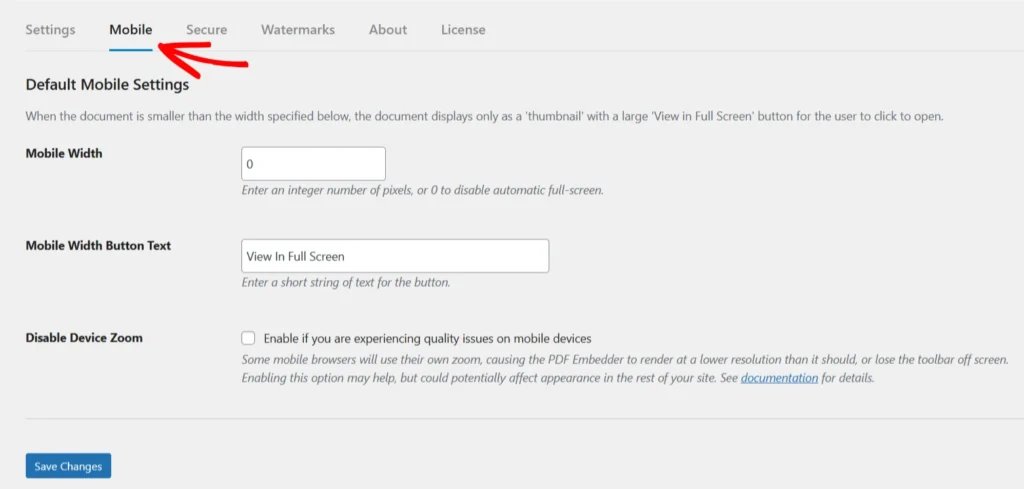
The Mobile Width field sets the pixel width below which the viewer switches to thumbnail mode. The default is 500. You should change this value to match your preferred layout. If you don’t wish to show the ‘View Full-Screen‘ button, simply set the width to 0.
If the width is more than 0 and there is no ‘Fullscreen Text’ set, you might face issues with scrolling not working on devices within the set width
Disabling device zoom
The Disable Device Zoom setting prevents the browser from zooming the PDF viewer on mobile devices. This is off by default.
You should enable it if you run into situations where the mobile browser zooms into the viewer unexpectedly, hiding the toolbar or distorting the display. This setting can also address quality issues that appear when device zoom is active.
Frequently Asked Questions
Below are some common questions about mobile viewer settings.
Are the mobile settings available in the free version?
No. The Mobile tab and all mobile-specific settings require any paid plan of our PDF Embedder Premium plugin.
Continuous scrolling is not working on mobile
One major cause is when the overlay is enabled without any Full-Screen text added. Change the mobile width to 0 or add the Full-Screen text in your PDF Embedder settings.
The toolbar disappears when I zoom on my phone. How do I fix that?
Turn on Disable Device Zoom in Settings > PDF Embedder > Mobile. This prevents the browser from zooming the viewer container and keeps the toolbar in view.