

Looking to stop your PDF Embedder subscription from renewing automatically? Whether you no longer want to use our plugin or wish to renew your license manually, you can easily manage your subscription from your account.
This guide explains how to cancel the auto-renewal on your PDF Embedder subscription and what to expect after cancellation.
Turning Off Auto-Renewal
To get started, you’ll first need to access your account.
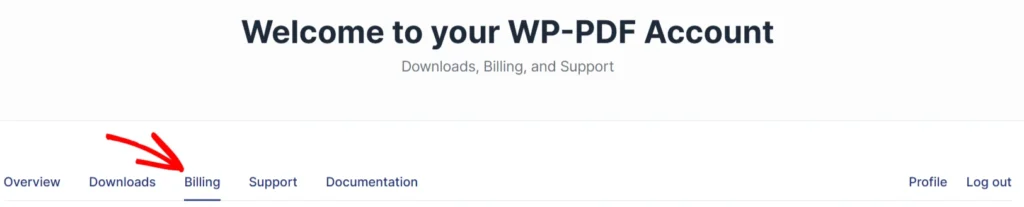
Next, click on the Billing tab. This page will display all of your previous license payments and all of your active subscriptions.
On this page, scroll down to the Subscriptions section, then select Cancel in the far right column next to the subscription you want to cancel.
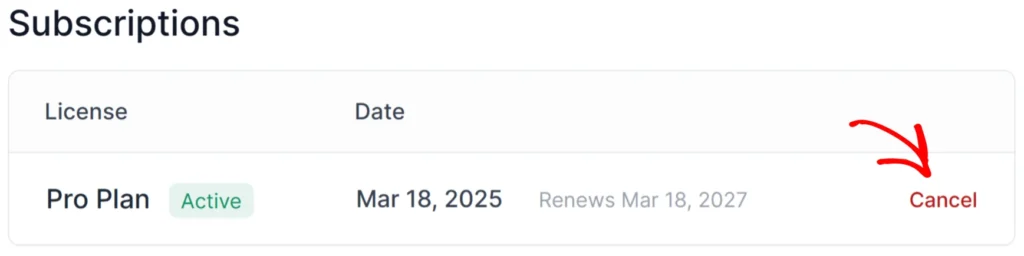
This cancels the automatic renewal only. Your license remains active and fully functional until the current subscription period ends.
Note: At the end of your subscription year, if you receive automated emails about the subscription expiring and the option for manual renewal, you can ignore the emails if you don’t intend to renew.
What Happens After the Subscription Expires
If your license subscription expires and is not renewed, the PDF Embedder plugin will continue to function on your site as long as it remains installed and activated. An expired license does not “break” your existing embeds or deactivate the plugin.
However, several key services will change:
- Updates stop: You no longer receive plugin updates, which keep the plugin compatible with the latest versions of WordPress and PHP. Running outdated software can eventually lead to security vulnerabilities or layout conflicts as the rest of your website evolves.
- Premium Support Ends. Access to the dedicated email support team is reserved for customers with an active subscription. If you encounter a technical issue or need assistance with a configuration after your license expires, you are not eligible for premium support.
Keeping a plugin on an outdated version for an extended period is not recommended, since updates include security patches and compatibility fixes. That said, a short gap between expiry and renewal is generally not a serious concern.
Frequently Asked Questions
Below, we’ve addressed common questions about cancelling a PDF Embedder subscription.
Can I get a refund on my purchase?
Yes! Over the first 14 days of purchase, we offer a 100% No-Risk Money Back Guarantee. If the product isn’t the best fit, simply contact our support team, and we’ll happily refund 100% of your money. The guarantee applies to new purchases only; renewals are non-refundable per our terms of service.
Can I downgrade my license instead of canceling?
Downgrading can be a good alternative to canceling if you want to keep using PDF Embedder but no longer need some of the features in a higher license level. Currently, there’s no self-service option to downgrade from your account. Please get in touch with our support team, and we’ll be happy to help.